AI CRM vs Traditional CRM: Build Smart Dashboard with AI
Are you struggling to manage customer data effectively? Want a CRM that predicts trends, automates workflows, and gives smarter insights than traditional tools?
If so, you’re not alone. Businesses today face data overload and customer expectations that evolve rapidly. Choosing the right CRM can mean the difference between reactive management and proactive growth. While traditional CRMs have been around for decades, AI-powered CRMs are transforming the way businesses capture, analyze, and act on customer data.
In this article, we’ll explore AI CRM vs traditional CRM, explain how AI integrates with smart business dashboards, provide a comparison table, and answer frequently searched questions to help you make the best choice for your business.
What Is a CRM?
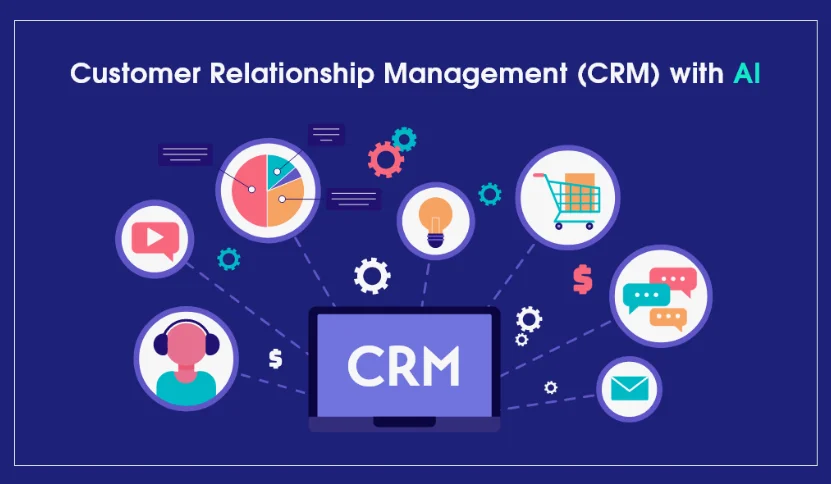
A Customer Relationship Management (CRM) system is a software tool that helps businesses manage interactions with customers, track leads, and streamline processes.
Traditional CRM: Focuses on storing customer data, managing contacts, and reporting historical interactions.
AI CRM: Adds artificial intelligence features like predictive analytics, automated workflows, and intelligent insights to drive smarter decisions.
Key Differences: AI CRM vs Traditional CRM
| Feature | Traditional CRM | AI CRM |
|---|---|---|
| Data Management | Stores and organizes customer info | Stores data + predicts trends and behaviors |
| Analytics | Basic reports and dashboards | Predictive analytics, anomaly detection, actionable insights |
| Automation | Manual or basic workflow triggers | Smart automation, AI-driven task recommendations |
| Customer Segmentation | Manual tagging | AI-powered segmentation based on behavior & value |
| Lead Scoring | Basic scoring rules | Predictive scoring using ML models |
| Personalization | Manual emails & campaigns | AI suggests personalized messaging, content, and timing |
| Forecasting | Historical trend analysis | Predictive and real-time forecasting |
| Integration | Often manual | AI integrates with multiple tools and suggests actions |
Insight: AI CRMs do everything traditional CRMs do; plus predictive, intelligent and automated features that reduce manual work and improve decision-making.
Benefits of AI CRM Over Traditional CRM
1. Predictive Analytics
AI CRM can analyze historical data to predict customer behavior, like which leads are likely to convert, or which customers might churn.
2. Smart Lead Scoring
AI prioritizes leads based on likelihood to purchase, saving sales teams time.
3. Automated Workflow Recommendations
Instead of manually creating sequences, AI suggests the best actions for engagement, emails, or follow-ups.
4. Personalized Customer Interactions
AI CRMs suggest personalized content and communication for higher engagement rates.
5. Real-Time Insights
Dashboards powered by AI allow decision-makers to see trends instantly and act proactively.
How AI CRM Integrates with Smart Business Dashboards
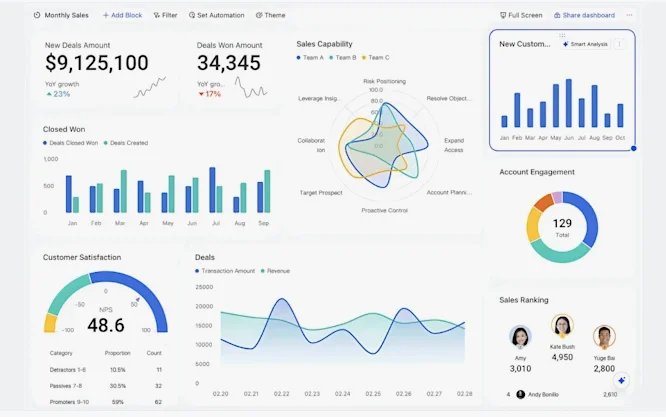
A smart business dashboard aggregates data from multiple sources — sales, marketing, finance, and customer interactions. When integrated with AI CRM:
- Predictive KPIs are displayed in real time
- Trends are automatically highlighted
- Alerts are triggered when metrics deviate from normal
- Automated recommendations appear for sales and marketing actions
Example dashboard sections:
- Sales Forecasts & Opportunities
- Customer Retention & Churn Alerts
- Marketing Campaign Performance
- Operational Efficiency Metrics
- Predictive Revenue & Trend Insights
Read more: How Generative AI Improves Customer Personalization
Step-by-Step: Building a Smart AI Business Dashboard
Step 1: Define Goals
Clarify what you want your dashboard to achieve:
- Predict revenue
- Monitor customer engagement
- Track team performance
Step 2: Identify Data Sources
Integrate data from:
- AI CRM (e.g., HubSpot AI CRM, Zoho CRM with Zia AI)
- Marketing tools (Mailchimp, Brevo)
- Financial systems (QuickBooks, Xero)
- Website & analytics platforms (Google Analytics, Shopify)
Step 3: Choose a Dashboard Tool
Recommended AI dashboard tools:
| Tool | AI Features | Best For |
|---|---|---|
| Tableau | Predictive analytics, NLP queries | Advanced BI dashboards |
| Power BI | AI visuals, anomaly detection | Business intelligence |
| Zoho Analytics | AI assistant, forecasting | Small-to-medium businesses |
| Domo | Real-time AI insights | Enterprise cloud |
| Looker Studio | Google integrations, AI plugins | Marketing analytics |
Step 4: Clean & Transform Data
Ensure high-quality, unified data using ETL tools or data warehouses (e.g., Fivetran, BigQuery).
Step 5: Build Visualizations
- Use charts, graphs, and KPIs that reflect your goals
- Prioritize top metrics at the top
- Avoid clutter for clarity
Step 6: Implement AI Insights
Enable AI modules for:
- Forecasting & predictions
- Anomaly detection
- Trend & pattern recognition
Step 7: Test & Iterate
Regularly refine dashboards:
- Check predictions accuracy
- Validate alerts
- Incorporate user feedback
Choosing Between AI CRM and Traditional CRM
Questions to consider:
- Do you need predictive insights and smart automation? → Choose AI CRM
- Is your team small and focused on basic contact management? → Traditional CRM may suffice
- Do you have complex data from multiple channels? → AI CRM provides integrated intelligence
Benefits of a Smart AI Dashboard with AI CRM
- Centralized data: One interface for all departments
- Actionable insights: AI highlights what matters most
- Time efficiency: Automates analysis and reporting
- Data-driven decisions: Reduces guesswork and errors
- Scalability: Dashboard grows with your business and data
FAQs (Frequently Searched Questions)
Q1. Can AI CRM replace a sales team?
No, but it augments productivity by predicting leads, prioritizing tasks, and automating repetitive work.
Q2. Are AI dashboards difficult to set up?
Not necessarily. Modern tools like Power BI, Zoho Analytics, and Tableau simplify setup with drag-and-drop interfaces and AI assistants.
Q3. How do AI CRMs improve customer engagement?
By predicting behavior, personalizing communication, and automating timely follow-ups.
Q4. Can traditional CRM integrate AI features?
Some traditional CRMs offer add-ons or integrations to include AI, but native AI CRMs provide deeper insights and better automation.
Q5. What’s the ROI of switching to AI CRM?
Higher sales conversion, reduced churn, faster decision-making, and time saved on manual processes contribute to measurable ROI.
Final Thoughts
Choosing between AI CRM and traditional CRM depends on your business goals, data complexity, and growth plans. For small-to-medium businesses looking to scale efficiently, AI CRM paired with a smart business dashboard is a game-changer turning raw data into actionable insights, predictive forecasts and automated workflows.
The future of CRM is intelligent. Start integrating AI today, and transform your customer relationships and business decisions.